The way a small business accepts Apple Pay here changed in May 2026, and it changed in the direction that matters most to a small operator: you no longer need a card machine at all.
Tap to Pay on iPhone launched locally that month, which lets a merchant take contactless payments directly on an iPhone with no extra hardware and no terminal. Yoco and iStore Pay were the first local platforms to offer it. If you already carry an iPhone, the cost of starting to accept cards has effectively dropped to an app.
What Apple Pay actually is from the merchant side
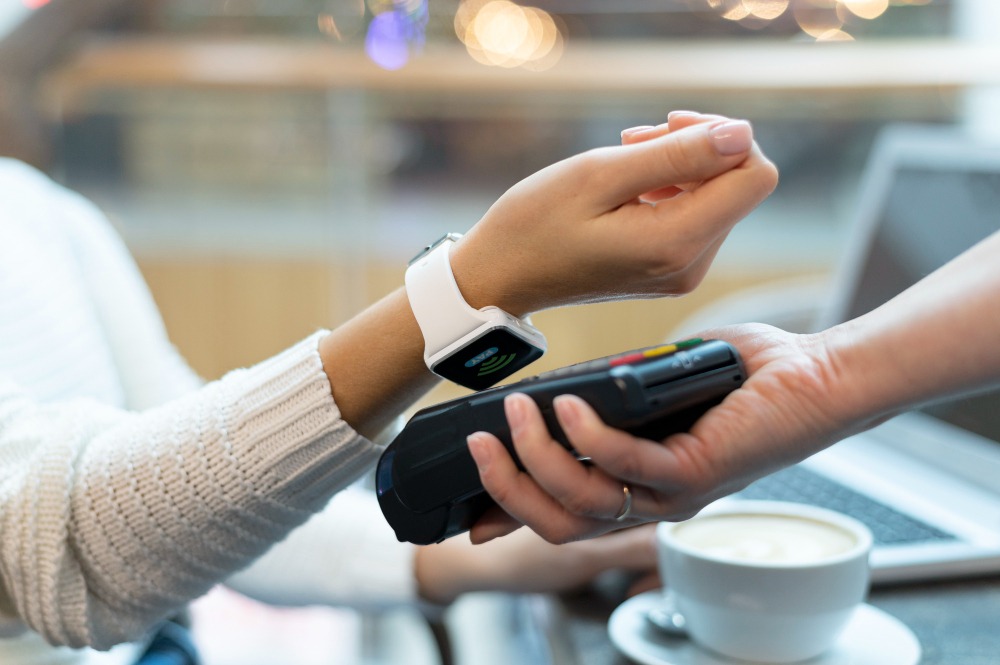
Apple Pay is a digital wallet. A customer loads a card from their bank into it, then pays by holding their iPhone or Apple Watch near your terminal and authorising with Face ID, Touch ID or a passcode.
The important part for you is that this is not a separate payment method you sign up for. Apple Pay presents itself to your terminal as an ordinary contactless card transaction. If your machine already takes tap payments, it already takes Apple Pay. Many small businesses have been accepting it for years without realising.
The card number is never shared with you. The wallet substitutes a device-specific token, which is why Apple Pay reduces your exposure rather than adding to it.
Tap to Pay on iPhone: no card machine
This is the genuinely new option. Instead of buying or renting a terminal, the iPhone itself becomes the reader.
A merchant on an iPhone XS or later, running a current version of iOS, installs a supported provider’s app and can start accepting contactless payments within minutes. It accepts contactless Visa and Mastercard cards, Apple Pay and other digital wallets, with American Express noted as coming. Yoco was first to market with it locally through the Yoco app, alongside iStore Pay.
Who this suits is fairly clear. Anyone mobile or occasional: a market trader, a mobile therapist or groomer, a photographer collecting a balance on the day, a plumber taking payment at the customer’s home, a pop-up stall. Anyone who previously took only cash or an EFT promise because a terminal could not be justified.
Who it does not replace: a busy retail counter still benefits from a dedicated terminal, both for speed and because you do not want your till tied to a phone that also rings.
If you would rather use a card machine
Nothing has stopped working. A contactless-capable card machine from any of the local providers accepts Apple Pay as part of ordinary tap functionality.
When comparing providers, look past the headline rate at three things: the per-transaction percentage, the settlement period, and whether there is a monthly or rental fee. A slightly cheaper rate that settles several days later can be worse for a business running tight on cash. Our review of the top payment gateways compares the local options.
Accepting it online
For a website, Apple Pay is enabled through your payment gateway rather than by any direct arrangement with Apple. Most local gateways support it as one of the wallet options you switch on.
Where it earns its keep online is checkout completion. A customer paying with a wallet does not type a card number, a delivery address or a billing address, which removes most of the friction that causes abandoned baskets on a phone. If a meaningful share of your traffic is mobile, and locally it will be, that is the reason to enable it.
Test it on a real iPhone before you announce it. A wallet button that appears and then fails is worse than not offering it.
What it costs you
Apple does not charge the merchant a separate fee. You pay your normal processing rate for the transaction, exactly as you would for any other contactless card payment.
Tap to Pay removes the hardware cost entirely, which for a small or seasonal business is often the actual barrier rather than the percentage. Budget instead for the things people forget: a phone that holds charge through a trading day, and a connection that works where you trade.
Whether it is worth enabling
For most businesses this is not really a decision, because if you take contactless cards you already accept it.
The real decision is whether to take card payments at all when you currently do not. The arguments in favour are straightforward. Cash handling has its own costs and risks. A customer who cannot pay the way they want sometimes does not buy. And digital payments leave a record, which makes your bookkeeping, your tax submissions and any future funding application considerably easier, since a lender assessing you wants to see turnover they can verify.
The argument against is cost per transaction on very low-value sales, where a percentage plus a fixed fee can eat a thin margin. Work out your real cost on your actual average basket rather than on the headline rate.
Practical things worth getting right
Put a contactless or Apple Pay sticker where customers can see it before they reach the front of the queue. People decide how they are paying while they wait.
Train whoever works the counter. The most common failure is staff telling a customer it does not work because they have not held the phone close enough or long enough.
Reconcile daily rather than monthly. Settlement timing differs by provider, and catching a discrepancy on the day is far easier than reconstructing it three weeks later. If you are using a phone as your terminal, treat the phone as business equipment: passcode, current iOS, and access removed promptly if a staff member leaves.
Frequently asked questions
Do I need to sign up with Apple to accept Apple Pay?
No. It arrives at your terminal as an ordinary contactless card transaction, so if your machine accepts tap payments it already accepts Apple Pay.
Can I accept Apple Pay without a card machine?
Yes, since May 2026. Tap to Pay on iPhone lets you take contactless payments on an iPhone XS or later with no additional hardware, through a supported provider’s app. Yoco and iStore Pay were first to offer it locally.
Does Apple charge the merchant a fee?
No separate Apple fee. You pay your usual processing rate for the transaction.
How do I accept it on my website?
Through your payment gateway, which offers it as a wallet option to enable. It tends to improve checkout completion on mobile because the customer does not retype card or address details.
Is it safe?
Your card number is never shared with the merchant. The wallet uses a device-specific token and each payment is authorised by the customer with Face ID, Touch ID or a passcode.
Further reading
Originally published in June 2023. Updated September 2026 to cover Tap to Pay on iPhone, which launched locally in May 2026. Provider availability and fees change, so confirm current terms with your payment provider before you commit.