
On SME South Africa, people connect with people. A clear photo of your face builds trust and helps other founders, partners, and funders recognise you. A company logo or a blank avatar does the opposite, so we ask every member to use a real photo.
What makes a good profile photo
- Your face is clearly visible and well lit
- It is a recent photo of you, not a logo, graphic, or group shot
- You look approachable, the way you would for a business meeting
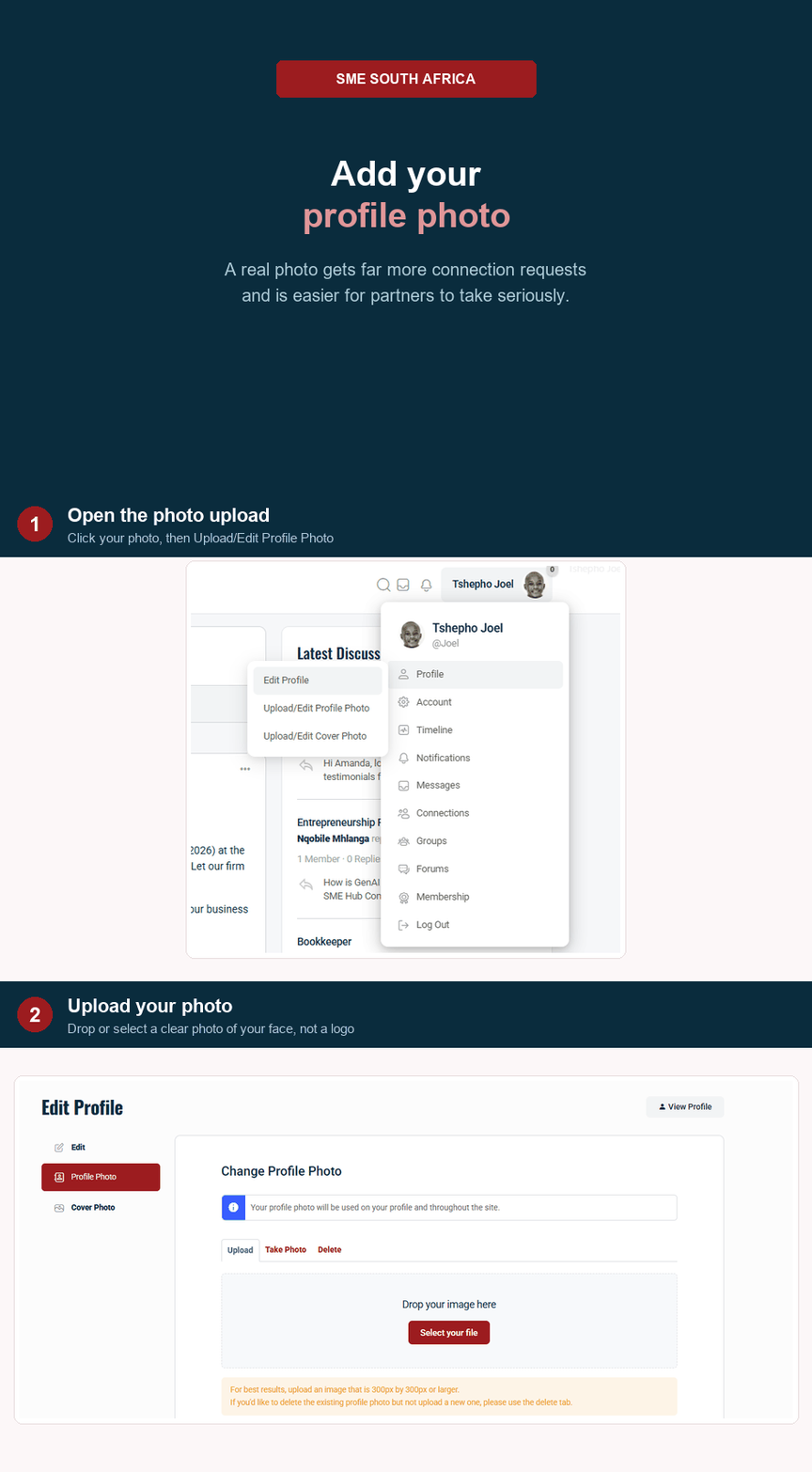
How to add or change your photo
- Tap your picture at the top right, then choose Profile.
- Choose Edit, then look for the profile photo area.
- Upload a photo from your phone or computer.
- Adjust the crop so your face is centred, then save.
Please do not use a logo
Your business has its own space to shine elsewhere on the platform. Your profile photo is about you, the person behind the business. If you upload a logo, our team may remove it and ask you to add a real photo so the community stays personal and trusted.
Need help
If your photo will not upload, check that the file is a JPG or PNG and under a few megabytes. Still stuck, reach out through the contact page and we will help.