
Your profile is how the rest of the community sees you. A complete profile helps other founders, partners, and funders understand who you are and what you do. Setting it up takes about five minutes.
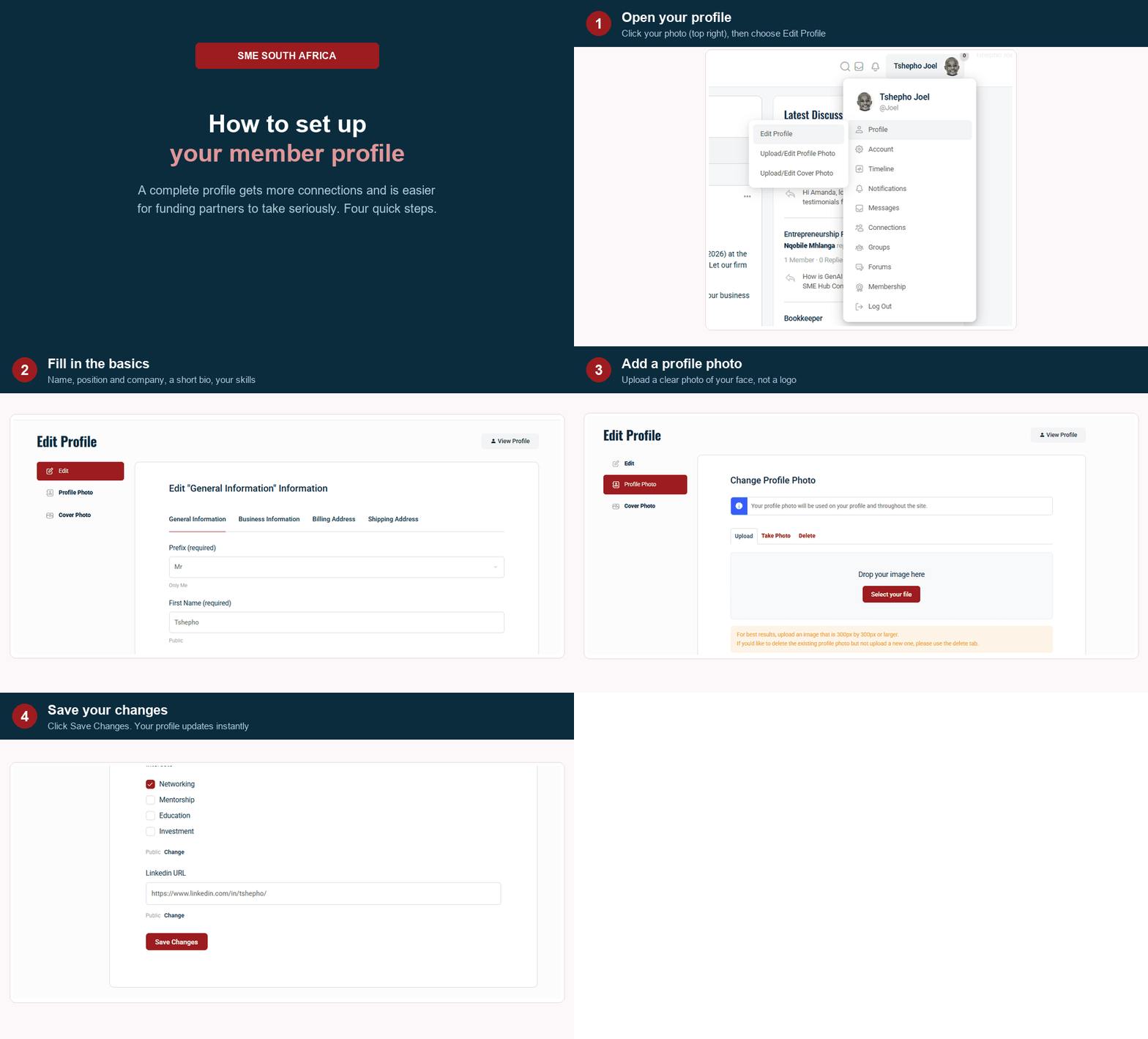
Open your profile
Tap your picture at the top right of any page, then choose Profile. To make changes, choose Edit.
Fill in the basics
- Name. Use your real first and last name.
- Position and company. For example, Platform Manager at SME South Africa. This shows on your card across the community.
- About you. A few sentences on what your business does and who you help.
- Skills and industry. These help other members find you in search.
Add a profile photo
Please use a clear photo of your face, not your company logo. Members connect with people, and a real photo gets far more responses. See the separate guide on adding a profile photo if you need help.
Save your changes
Once you are happy, save. Your profile updates straight away. You can come back and edit it any time as your business grows.
Why a full profile matters
Members with a complete profile and a real photo show up more often in the community, get more connection requests, and are easier for funding partners to take seriously.